
Calling an IBM i SQL Stored Procedure from C# (.NET) with NTi
Introduction
Stored procedures let you centralize and encapsulate business logic in a secure, optimized environment. They shift part of the application logic onto the database server, which reduces client-side code complexity, improves performance by cutting network traffic, and strengthens security by limiting direct access to the tables.
This tutorial shows how to call an IBM i SQL stored procedure from a C# (.NET) application using NTi.
The procedure used here comes from IBM's official documentation, the DB2 for i SQL Reference (page 1141). It computes the median staff salary and returns the list of employees earning above that median.
Three things are covered:
- Classic approach with a DataReader
- Simplified approach with Dapper, a lightweight micro-ORM
- Procedures with multiple result sets using NextResultAsync
Step 1 - Prepare the IBM i Environment
Before calling the procedure from .NET, you need to understand what it does, what it requires (tables, data), and prepare the IBM i environment.
Here is the procedure's SQL code, taken from the DB2 for i SQL Reference manual (page 1141):
CREATE PROCEDURE MEDIAN_RESULT_SET (OUT medianSalary DECIMAL(7,2))
LANGUAGE SQL
DYNAMIC RESULT SETS 1
BEGIN
    DECLARE v_numRecords INTEGER DEFAULT 1;
    DECLARE v_counter INTEGER DEFAULT 0;
    DECLARE c1 CURSOR FOR
         SELECT salary
         FROM staff
         ORDER BY salary;
    DECLARE c2 CURSOR WITH RETURN FOR
         SELECT name, job, salary
         FROM staff
         WHERE salary > medianSalary
         ORDER BY salary;
    DECLARE EXIT HANDLER FOR NOT FOUND
         SET medianSalary = 6666;
    SET medianSalary = 0;
    SELECT COUNT(*) INTO v_numRecords FROM staff;
    OPEN c1;
    WHILE v_counter < (v_numRecords / 2 + 1) DO
         FETCH c1 INTO medianSalary;
         SET v_counter = v_counter + 1;
    END WHILE;
    CLOSE c1;
    OPEN c2;
END
This procedure computes the median employee salary. It returns that salary through an output parameter, medianSalary, and opens a cursor, c2, that returns the list of employees whose salary exceeds that median.
| Parameter | Type | Direction | Description |
|---|---|---|---|
| medianSalary | Decimal(7,2) | OUT | Median salary computed by the procedure |
💡 There's no input parameter. The procedure runs its calculation directly against the
stafftable.
For the procedure to work, a staff table needs to exist in the same schema, with at least the salary (DECIMAL), name, and job columns.
Create the library
Create an MDSALARY library to keep the test objects isolated. CRTLIB is a CL command, not a SQL statement. In ACS's Run SQL Scripts tool, a CL command is prefixed with CL: and ends with ;, like the rest of the script:
CL: CRTLIB MDSALARY;Set the current schema
Set the current schema so that every SQL statement that follows refers to it automatically:
SET CURRENT SCHEMA = MDSALARY;From here on, every table or procedure you create lands automatically in the MDSALARY library.
Create the STAFF table
Create the staff table with the required columns:
CREATE TABLE staff (
    name VARCHAR(50),
    job VARCHAR(50),
    salary DECIMAL(7,2)
);name- the employee's namejob- their rolesalary- their salary
Insert a data set
Insert some representative data so the median salary means something:
INSERT INTO staff (name, job, salary) VALUES ('Alice', 'Manager', 2000.00);
INSERT INTO staff (name, job, salary) VALUES ('Bob', 'Clerk', 3000.00);
INSERT INTO staff (name, job, salary) VALUES ('Charlie', 'Analyst', 4000.00);
INSERT INTO staff (name, job, salary) VALUES ('David', 'Developer', 5000.00);
INSERT INTO staff (name, job, salary) VALUES ('Eve', 'Designer', 6000.00);
INSERT INTO staff (name, job, salary) VALUES ('Frank', 'Tester', 7000.00);
Complete script, ready to run in ACS
Paste this script into ACS's Run SQL Scripts tool and run it all at once:
-- Create the library (CL command: CL: prefix and trailing semicolon)
CL: CRTLIB MDSALARY;

-- Set the current schema
SET CURRENT SCHEMA = MDSALARY;

-- Create the STAFF table
CREATE TABLE staff (
    name VARCHAR(50),
    job VARCHAR(50),
    salary DECIMAL(7,2)
);

-- Insert test data
INSERT INTO staff (name, job, salary) VALUES ('Alice', 'Manager', 2000.00);
INSERT INTO staff (name, job, salary) VALUES ('Bob', 'Clerk', 3000.00);
INSERT INTO staff (name, job, salary) VALUES ('Charlie', 'Analyst', 4000.00);
INSERT INTO staff (name, job, salary) VALUES ('David', 'Developer', 5000.00);
INSERT INTO staff (name, job, salary) VALUES ('Eve', 'Designer', 6000.00);
INSERT INTO staff (name, job, salary) VALUES ('Frank', 'Tester', 7000.00);

-- Create the MEDIAN_RESULT_SET stored procedure
CREATE PROCEDURE MEDIAN_RESULT_SET (OUT medianSalary DECIMAL(7,2))
LANGUAGE SQL
DYNAMIC RESULT SETS 1
BEGIN
    DECLARE v_numRecords INTEGER DEFAULT 1;
    DECLARE v_counter INTEGER DEFAULT 0;
    DECLARE c1 CURSOR FOR
         SELECT salary FROM staff ORDER BY salary;
    DECLARE c2 CURSOR WITH RETURN FOR
         SELECT name, job, salary FROM staff WHERE salary > medianSalary ORDER BY salary;
    DECLARE EXIT HANDLER FOR NOT FOUND SET medianSalary = 6666;
    SET medianSalary = 0;
    SELECT COUNT(*) INTO v_numRecords FROM staff;
    OPEN c1;
    WHILE v_counter < (v_numRecords / 2 + 1) DO
         FETCH c1 INTO medianSalary;
         SET v_counter = v_counter + 1;
    END WHILE;
    CLOSE c1;
    OPEN c2;
END;
Verify on the IBM i
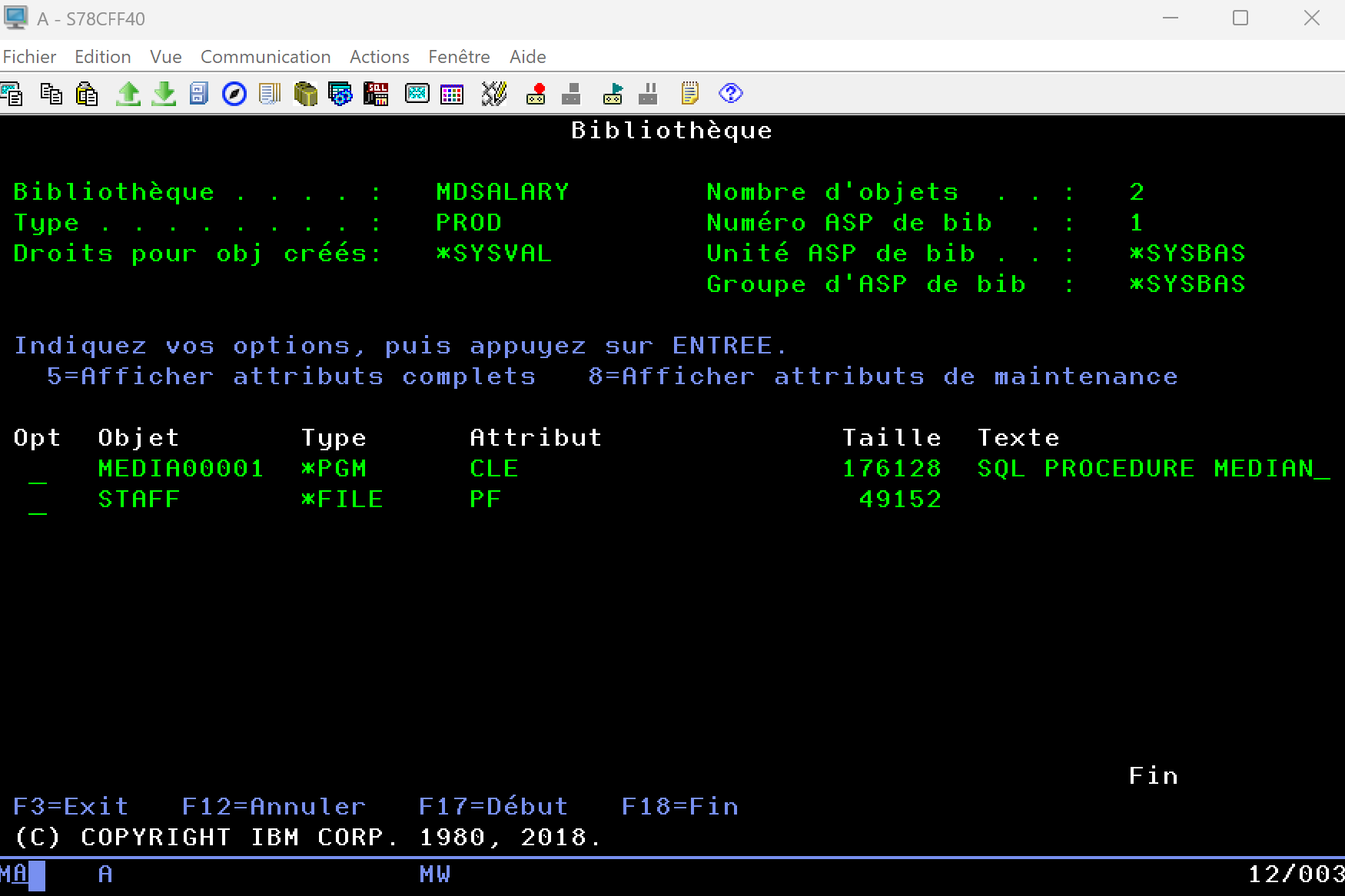
Check that the MDSALARY library exists, that it holds the staff table with the inserted data, and the MEDIAN_RESULT_SET procedure (type *PGM).
Step 2 - Call the Stored Procedure from .NET
Create a Blazor Web App project on .NET 8 and install the following packages:
dotnet add package Aumerial.Data.Nti
dotnet add package Dapper
Create a connection service
Create a DB2Service.cs service to centralize connection handling. With NTi, asynchronous is the normal path. Async is genuinely end to end (OpenAsync through to DisposeAsync), with no thread blocking. The synchronous path (Open()) remains available for contexts that require it.
using System.Threading;
using System.Threading.Tasks;
using Aumerial.Data.Nti;

public class DB2Service
{
    private readonly string _connectionString =
        "server=MY_SYSTEM;user=MY_USER;password=MY_PASSWORD;pooling=true";

    public async Task CreateConnectionAsync(CancellationToken cancellationToken = default)
    {
        var conn = new NTiConnection(_connectionString);
        await conn.OpenAsync(cancellationToken);
        return conn;
    }
}
💡 A few defaults worth knowing. Connection pooling is off by default (v4 compatibility), hence the
pooling=true, strongly recommended for a web application. Every timeout is also unlimited by default (0 = infinite), andpersist security info=falsestrips the password fromConnectionStringas soon as the connection opens.
Then register this service in Program.cs:
builder.Services.AddSingleton(); Create the Employee entity
public class Employee
{
    public string Name { get; set; } = "";
    public string Job { get; set; } = "";
    public decimal Salary { get; set; }
}
Inject the service into the Blazor component
An easy thing to miss: the component has to receive the service through the @inject directive, or Db2Service won't exist in the component's code. The names stay consistent end to end, with the class called DB2Service and the injected instance Db2Service.
Create a StoredProcedure.razor component:
@page "/stored-procedure"
@rendermode InteractiveServer
@using System.Data
@using Aumerial.Data.Nti
@using Dapper
@inject DB2Service Db2Service

<h3>Salaries above the median</h3>

<button class="btn btn-primary" @onclick="LoadDataWithDataReader">DataReader</button>
<button class="btn btn-secondary" @onclick="LoadDataWithDapper">Dapper</button>

<p>Median salary: @median</p>

<table class="table">
    <thead>
        <tr><th>Name</th><th>Job</th><th>Salary</th></tr>
    </thead>
    <tbody>
        @foreach (var employee in employees)
        {
            <tr><td>@employee.Name</td><td>@employee.Job</td><td>@employee.Salary</td></tr>
        }
    </tbody>
</table>
The fields and methods for the two approaches below go in the component's @code block:
private decimal median;
private List employees = new();
Method 1 - Classic Approach (DataReader)
Create a connection through Db2Service, set up an NTi command to call MEDIAN_RESULT_SET, define the medianSalary output parameter, then read the results through a DataReader:
private async Task LoadDataWithDataReader()
{
    employees.Clear();

    await using var conn = await Db2Service.CreateConnectionAsync();
    await using var cmd = new NTiCommand("MDSALARY.MEDIAN_RESULT_SET", conn);
    cmd.CommandType = CommandType.StoredProcedure;

    var param = new NTiParameter
    {
        ParameterName = "medianSalary",
        Direction = ParameterDirection.Output
    };
    cmd.Parameters.Add(param);

    await using var reader = await cmd.ExecuteReaderAsync();
    median = Convert.ToDecimal(param.Value);

    while (await reader.ReadAsync())
    {
        employees.Add(new Employee
        {
            Name = reader.GetString(0),
            Job = reader.GetString(1),
            Salary = reader.GetDecimal(2)
        });
    }
}
Method 2 - Simplified Approach (Dapper)
With Dapper, set the output parameter through DynamicParameters. Dapper handles the execution automatically and maps the results straight into a list of Employee objects:
private async Task LoadDataWithDapper()
{
    await using var conn = await Db2Service.CreateConnectionAsync();

    var parameters = new DynamicParameters();
    parameters.Add("medianSalary", dbType: DbType.Decimal, direction: ParameterDirection.Output);

    employees = (await conn.QueryAsync(
        "MDSALARY.MEDIAN_RESULT_SET",
        parameters,
        commandType: CommandType.StoredProcedure)).ToList();

    median = parameters.Get("medianSalary");
}
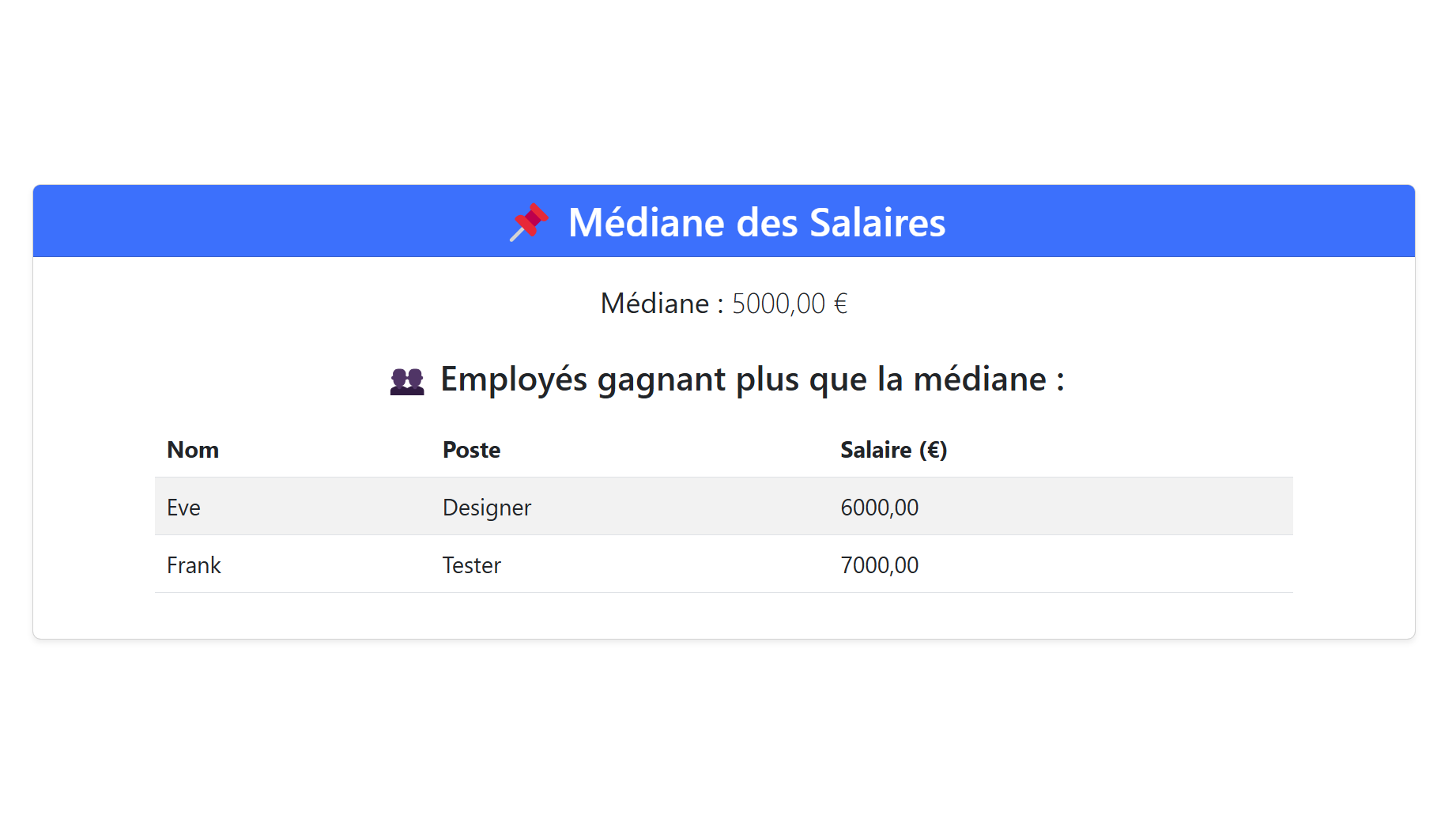
Display the results in a Blazor component
Step 3 - Multiple Result Sets (DYNAMIC RESULT SETS 2)
A DB2 for i procedure can return more than one result set. Just declare DYNAMIC RESULT SETS 2 (or more), and open several WITH RETURN cursors. On the .NET side, you move from one result set to the next with the standard ADO.NET method NextResultAsync (NextResult for the synchronous version).
Create a variant of the procedure that returns two lists, salaries above the median, then those at or below it:
CREATE PROCEDURE MDSALARY.MEDIAN_MULTI (OUT medianSalary DECIMAL(7,2))
LANGUAGE SQL
DYNAMIC RESULT SETS 2
BEGIN
    DECLARE v_numRecords INTEGER DEFAULT 1;
    DECLARE v_counter INTEGER DEFAULT 0;
    DECLARE c1 CURSOR FOR
         SELECT salary FROM staff ORDER BY salary;

    -- Result set 1: salaries above the median
    DECLARE c2 CURSOR WITH RETURN FOR
         SELECT name, job, salary FROM staff WHERE salary > medianSalary ORDER BY salary;

    -- Result set 2: salaries at or below the median
    DECLARE c3 CURSOR WITH RETURN FOR
         SELECT name, job, salary FROM staff WHERE salary <= medianSalary ORDER BY salary;

    DECLARE EXIT HANDLER FOR NOT FOUND SET medianSalary = 6666;
    SET medianSalary = 0;
    SELECT COUNT(*) INTO v_numRecords FROM staff;
    OPEN c1;
    WHILE v_counter < (v_numRecords / 2 + 1) DO
         FETCH c1 INTO medianSalary;
         SET v_counter = v_counter + 1;
    END WHILE;
    CLOSE c1;
    OPEN c2;
    OPEN c3;
END;
The result sets arrive in the order the cursors were opened (c2, then c3). On the component side, in the @code block:
private List above = new();
private List belowOrEqual = new();

private async Task LoadMultipleResultSets()
{
    above.Clear();
    belowOrEqual.Clear();

    await using var conn = await Db2Service.CreateConnectionAsync();
    await using var cmd = new NTiCommand("MDSALARY.MEDIAN_MULTI", conn);
    cmd.CommandType = CommandType.StoredProcedure;

    var param = new NTiParameter
    {
        ParameterName = "medianSalary",
        Direction = ParameterDirection.Output
    };
    cmd.Parameters.Add(param);

    await using var reader = await cmd.ExecuteReaderAsync();
    median = Convert.ToDecimal(param.Value);

    // First result set: cursor c2
    while (await reader.ReadAsync())
    {
        above.Add(new Employee
        {
            Name = reader.GetString(0),
            Job = reader.GetString(1),
            Salary = reader.GetDecimal(2)
        });
    }

    // Move to the next result set: cursor c3
    if (await reader.NextResultAsync())
    {
        while (await reader.ReadAsync())
        {
            belowOrEqual.Add(new Employee
            {
                Name = reader.GetString(0),
                Job = reader.GetString(1),
                Salary = reader.GetDecimal(2)
            });
        }
    }
}
💡 If you don't know the number of result sets ahead of time, loop with
do { ... } while (await reader.NextResultAsync());. With Dapper, the equivalent isQueryMultipleAsync.
What's next?
- Calling a program: calling an RPG program with input/output parameters
- Running a CL command: running a CL command and handling errors
- Connection: connection string, pooling, MFA
- NTiConnection: full reference for the connection class